When a step returns a list
Choose what the next call gets
The run pauses and shows what came back. Pick one item, several, or send the whole list: what you can choose follows the design, and Luvin remembers it for the next steps.
Coming 2027
Luvin turns your OpenAPI and AsyncAPI contracts into visual API workflows, writes the Arazzo for you and tests every step of the chain, against your API or in simulation.
Local-first. No account. Nothing leaves your machine.
Built on open standards
The problem
A single screen of your app usually depends on several APIs called in order. Log in on A to get a token, call B with it to get the customer, call C with the customer’s id. To test C, you call A and B by hand and copy values between responses. Every time. And nobody can quickly say which APIs that screen depends on, or how the data moves between them.

Luvin removes those manual calls and makes your integrations visible.
How it works
Add the OpenAPI and AsyncAPI files of the APIs involved, or import your Postman and Bruno collections.
Drag operations onto a canvas. Tokens, ids and fields are wired between steps by rules, no AI involved.
The canvas writes a standard Arazzo file, validated against the contracts as it changes.
Run generated and custom cases against the real API or in simulation, with verdicts in plain words.
Each operation you drop becomes a step. A customerId connects to the id returned by “create customer”, and anything nobody feeds becomes an input of the workflow. Drag the data lines to rewire them.
Happy path, invalid inputs, calls without credentials and every documented error path, generated from the contracts. Choose the status each rejection must return, run them all and read the verdict in plain words.
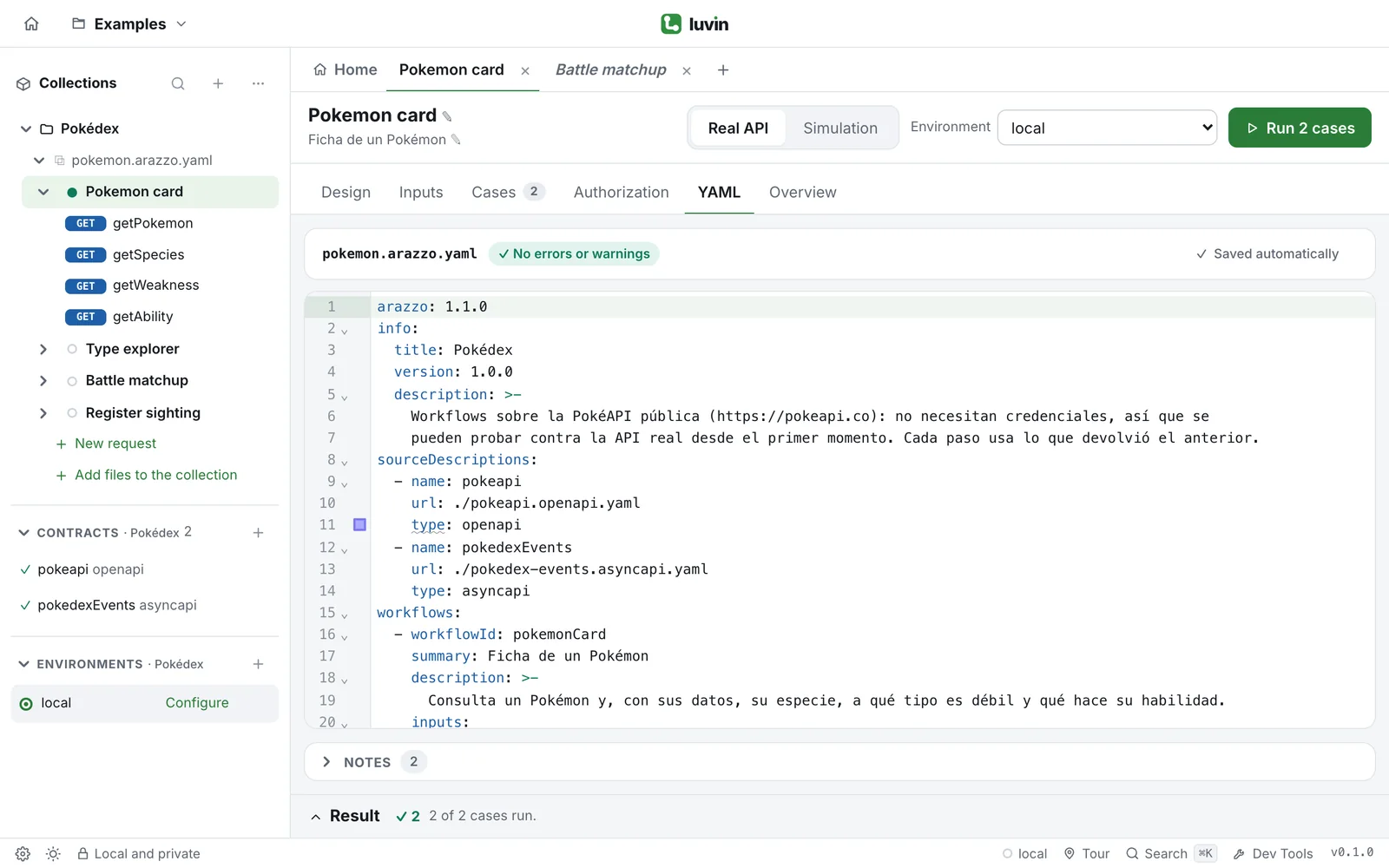
The canvas edits a real Arazzo file and keeps anything written by hand. The YAML validates as you type, underlines each problem on the exact value and autocompletes operations, outputs and inputs.
Real chains
Real integrations return lists, depend on other workflows and fail halfway. Luvin runs all of it, the way the Arazzo standard describes it.
When a step returns a list
The run pauses and shows what came back. Pick one item, several, or send the whole list: what you can choose follows the design, and Luvin remembers it for the next steps.
Workflows on workflows
Log in once and reuse it. A workflow can depend on another, call one as a step and use its outputs, even from another Arazzo file.
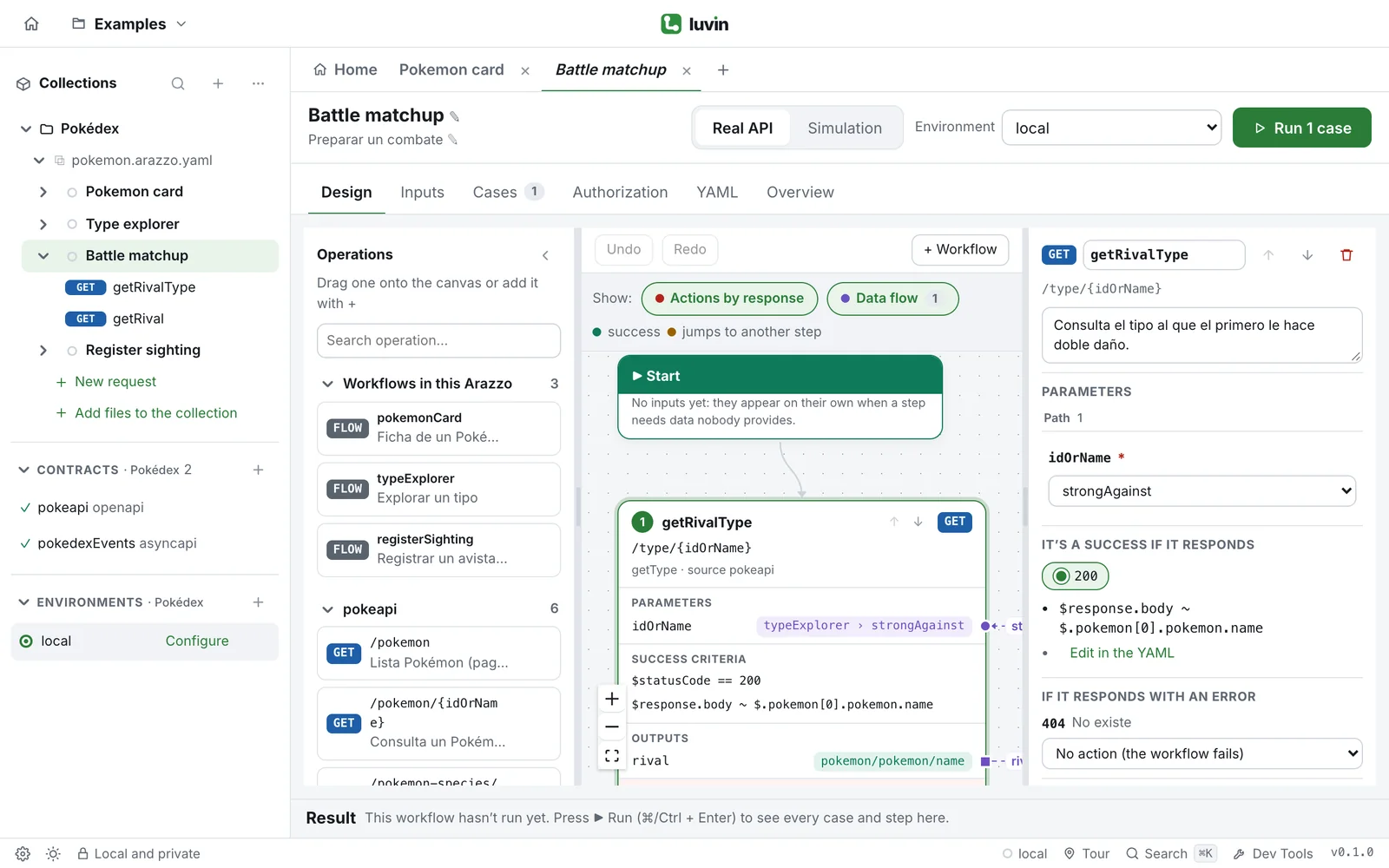
Success and failure actions, retries with their wait and limit, jumps to a step or to another workflow. Arazzo 1.0 and 1.1.
Every step answers from the contract’s examples, so you can try a chain before the API exists.
Mix HTTP calls with AsyncAPI send and receive steps, matched by correlationId, in the same workflow.
Edit a contract and Luvin tells you which workflows the change breaks, before you run them.
Also an API client
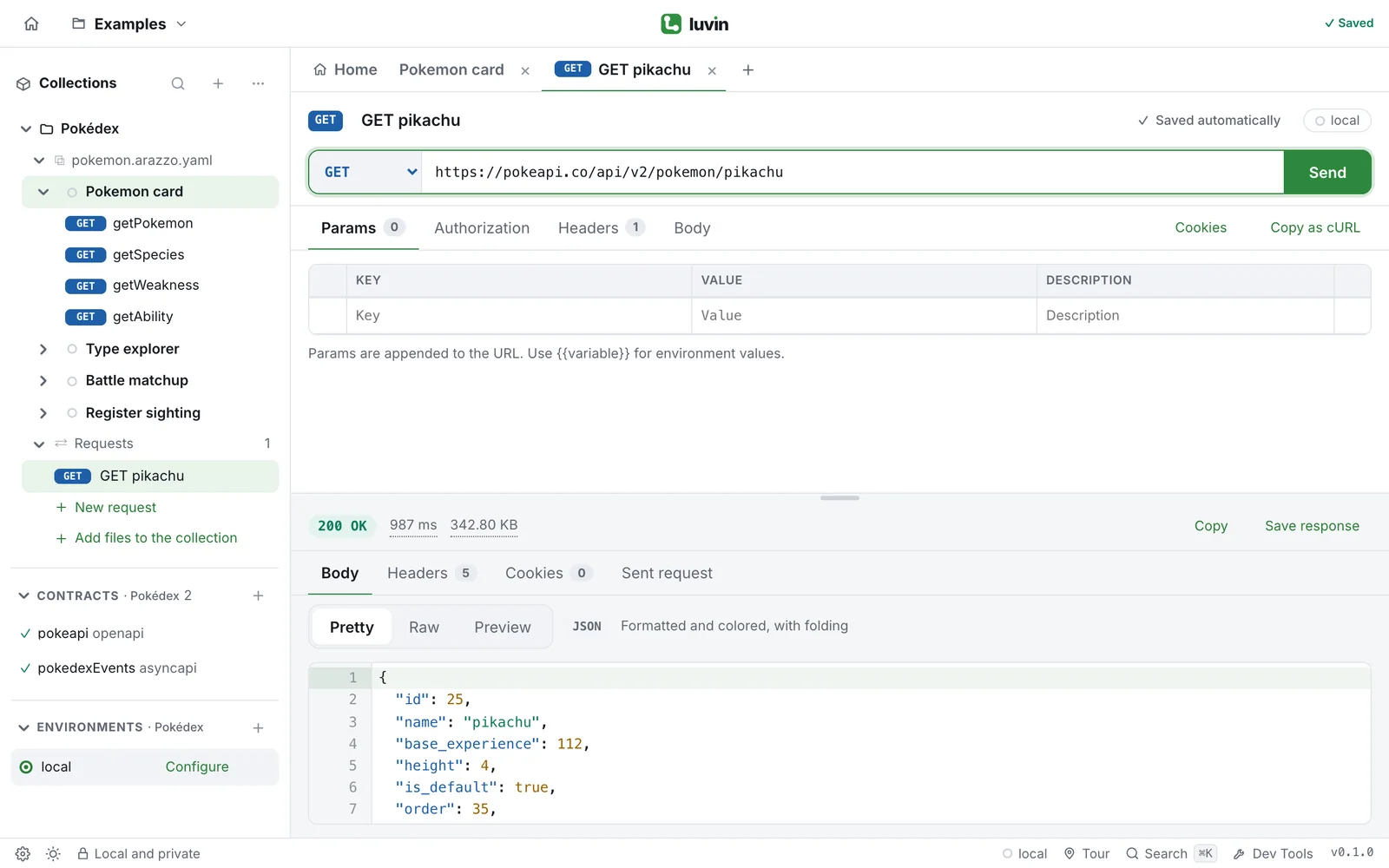
When one step fails you need to look at it on its own. Requests, collections and Dev Tools sit right next to your workflows.
Params kept in sync with the URL, automatic headers, cookies, saved examples, and timing and size for every response.
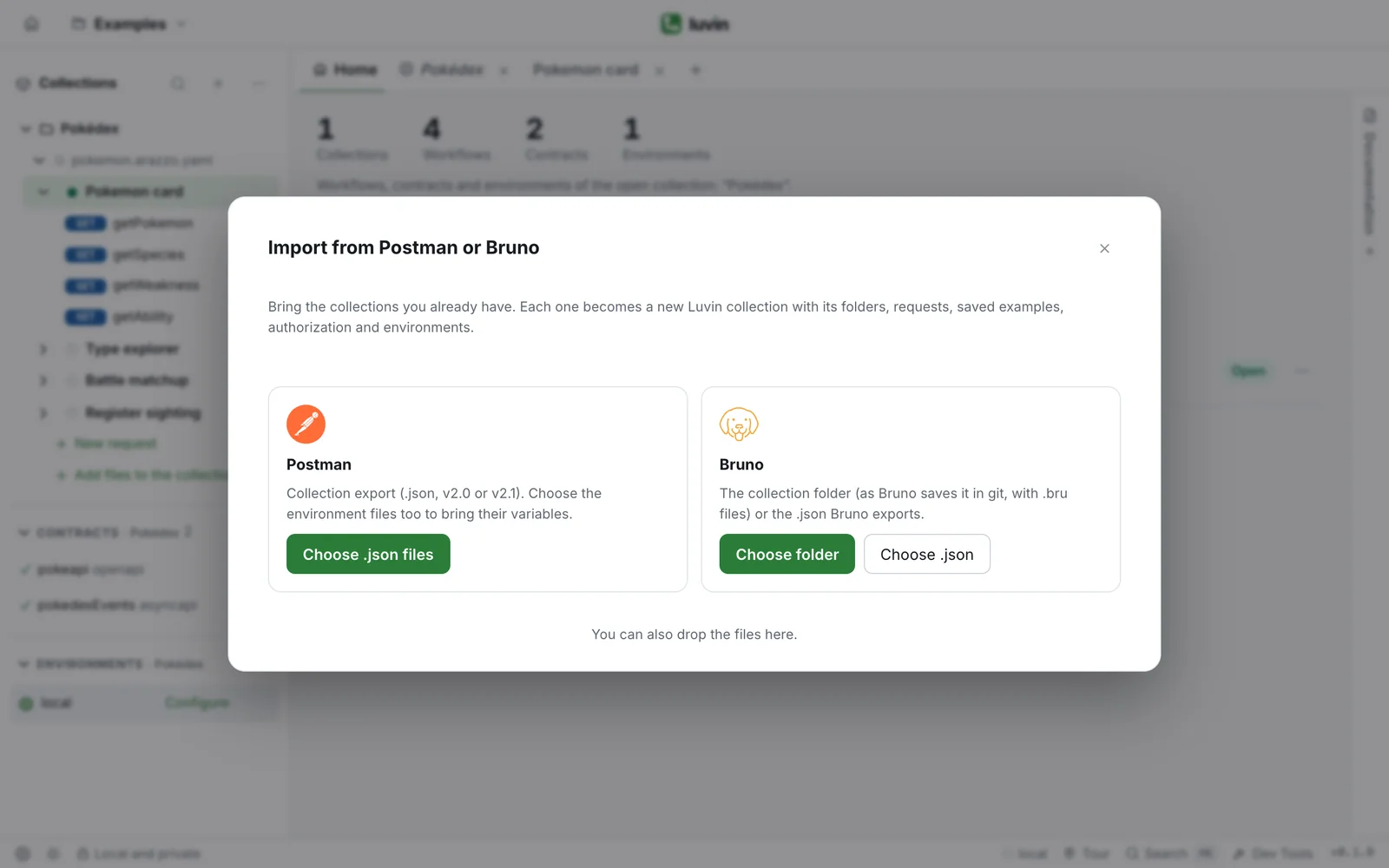
Import Postman and Bruno collections with their folders and environments, paste a cURL, or generate every request from an OpenAPI contract.
Each collection gets an overview with its workflows, last runs and contracts, plus documentation generated from them.
Console, Network with “Copy as cURL” (secrets masked), Performance and a terminal.
Authorization, per API or per workflow
Compare
API clients are great at single requests, and all of them can chain calls. The difference is what it takes to build the chain, see it and prove it works.
| — |  Luvin |  Postman |  Bruno |  Insomnia |
|---|---|---|---|---|
| Built around | Workflows across several APIs | Single requests and collections | Single requests and collections | Single requests and collections |
| Passing data between calls | Wired automatically from the contracts | Scripts or a Flow | Scripts (bru.setVar) | Response template tags |
| Seeing how data flows | A diagram of every API, step and field | Read the scripts, or build a Flow | Read the scripts | Open each request’s tags |
| Negative cases | Generated from the contract | Test scripts you write | Test scripts you write | Test scripts you write |
| What you keep | Arazzo, an open standard | A Postman collection | Bruno files in git | An Insomnia export |
Based on each product’s public documentation as of November 2026. Postman, Postman Flows, Bruno and Insomnia are trademarks of their respective owners; Luvin is not affiliated with them.
Features
Luvin calls every API in order, passing tokens, ids and any field from one step to the next.
Every workflow is a diagram: which APIs take part, in what order, and which field feeds which parameter.
Happy path, missing or invalid inputs, calls without credentials and one case per success or failure action.
“status is INACTIVE but ACTIVE was expected”, with the step and field highlighted.
Export the results of a run as a self-contained HTML report that anyone can open.
47 generators with the same names as in Postman, like {{$randomEmail}}, plus your own data cases.
Base URLs, variables and credentials per environment. Secrets are stored encrypted on your computer, never in the files.
A simple interface for people who only run workflows, a guided tour and ready-to-run examples.
No backend, no account. A workspace is a folder of plain files you review in a pull request.
Who it’s for
Who test chains of API calls by hand today and want generated negative cases and clear verdicts.
Who need to show that workflows across several APIs work end to end, with a report to share.
Who want to try a workflow with their own data in a simple interface, without test code.
Who want to see how their APIs connect and validate workflows before anything is built.
FAQ
Luvin launches in 2027. Join the waitlist for early access and an invitation to the first pilots.
No. Import your Postman or Bruno collections, or paste a cURL, and drag those requests onto the canvas: Luvin learns each response on the first run and suggests the wiring. With contracts you also get wiring by rules, generated negative cases and simulation.
The OpenAPI Initiative’s open standard for describing sequences of API calls. Luvin writes it for you and runs it, versions 1.0 and 1.1. The files are yours: keep them in git and run them with any Arazzo tool.
No. There is no backend and no account: requests go straight from your computer to your APIs, and secrets are stored encrypted on your machine.
As a desktop app for macOS and Windows. Everything runs on your computer: there is no backend and no account.
No. Luvin is for designing, debugging and demonstrating chains of APIs. The Arazzo files it writes are what you take to CI, with any Arazzo runner.
No. Wiring follows rules over your contracts, so the same contracts always give the same result, and anything uncertain is marked for you to review.
Coming 2027
Luvin launches in 2027. Join the waitlist for early access and the first pilots.